




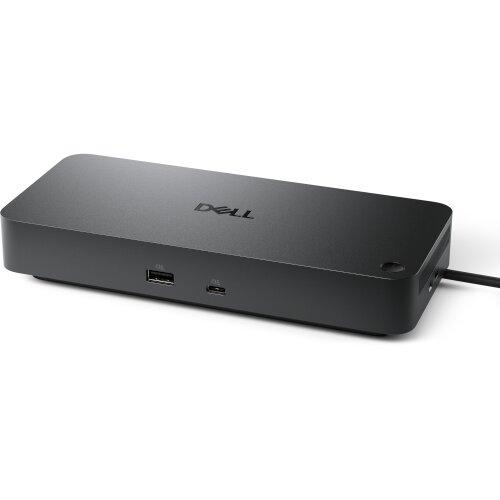
Dell Pro Thunderbolt 5 Dock - WD25TB5 210-BTHG

Power AI productivity
Maximise AI PC productivity with the Dell's most powerful Thunderbolt 5 dock and seamlessly run Gen AI tools across up to four 4K 120Hz displays. Featuring Extended Power Range, deliver up to 300W over a single USB-C cable to power even the highest-performance AI PCs, while modern ports ensure broad connectivity.
Accelerate manageability
Delivering ultimate IT efficiency across the modern workspace.
Improved manageability
Manage your dock through the Dell Device Management Console, using the Dell Display and Peripheral Manager along with the Dell Device Management Agent installed on your PC.
Simplify firmware updates
Reduce IT complexity by deploying a single firmware file across workspaces. Minimise end-user disruption with silent firmware updates, executed upon dock disconnection.
Unlock out-of-band management on select Intel® vPro® PCs with Intel® Active Management Technology (Intel® AMT) over Thunderbolt via the connected dock.
Work with confidence
Enhance your docking experience across brands with universally compatible features including MAC Address Pass-Through and Power Button Sync.
Connect your way
Configure your workspace to your liking with an ambidextrous USB-C cable that can be routed left or right.
| Network & Communication | |
| Ethernet Technology | 2.5 Gigabit Ethernet |
| Warranty | |
| Additional Warranty Information |
|
| Miscellaneous | |
| Package Contents |
|
| Kensington Security Slot | Yes |
| Power Description | |
| Maximum Power Supply Wattage | 330 W |
| Power Source Type | Power Adapter |
| Physical Characteristics | |
| Weight (Approximate) | 620 g |
| Height | 205 mm |
| Width | 90 mm |
| Depth | 35.3 mm |
| Software | |
| Operating System Supported | Ubuntu 24.04 |
| macOS | |
| Red Hat Enterprise Linux 9.7 | |
| ChromeOS 141 | |
| Windows 10 | |
| Windows 11 | |
| Host Software | Host Software (Windows):
Cloud Management (via host PC software) Dell Device Management Console enables:
|
| General Information | |
| Product Type | Docking Station |
| Manufacturer Part Number | 210-BTHG |
| Manufacturer Website Address | http://www.dell.com.au |
| Manufacturer | Dell Technologies |
| Product Model | WD25TB5 |
| Product Name | Pro Thunderbolt 5 Dock - WD25TB5 |
| Product Line | Pro Dock |
| Brand Name | Dell |
| Interfaces/Ports | |
| Host Interface | Thunderbolt 5 |
| Interfaces | Video interfaces:
USB Ports (Data Only):
|
| HDMI | Yes |
| HDMI Version | 2.1 |
| Number of HDMI Ports | 1 |
| Network (RJ-45) | Yes |
| DisplayPort | Yes |
| Total Number of USB Ports | 6 |
| Thunderbolt | Yes |
| Number of DisplayPorts | 2 |
| USB Type-C | Yes |
| USB Type-C Detail | 1 x USB-C 3.2 Gen 2 (10 Gbps), (15W), 1 x USB-C Multi-function DisplayPort (7.5W) |
| DisplayPort Version | 2.1 |
| Number of USB Type-C Ports | 2 |
| Number of USB Type-A Ports | 4 |
| Thunderbolt Ports Quantity | 2 |
| Number of USB 3.2 Gen 2 Type-A Ports | 4 |
| USB Type-A | Yes |
| Technical Information | |
| Cable Length | 83 cm |
| Device Supported | Notebook |
| Desktop PC | |
| Connectivity Technology | Wired |
| Features | Power Delivery Pass-through |
| LED Power Indicator | |
| Indicator Light | |
| Maximum Data Transfer Rate | 1.25 GB/s |
| Number of Displays Supported | 4 |
| Supported Resolutions | 2560 x 1440 |
| 6144 x 3456 | |
| 7680 x 4320 | |
| 5120 x 2160 | |
| 3840 x 2160 | |
| 3440 x 1440 | |
| Screen Mode Supported | 8K @ 60Hz |
| 4K UHD | |
| 4K @ 120Hz | |
| 4K @ 60Hz | |
| 5K @ 60Hz | |
| 6K @ 60Hz | |
| WQHD @ 60Hz | |
| QHD @ 60Hz | |
| Management Features | Firmware update on disconnect |
| Dock Power Button Sync | |
| Port Disablement | |
| PXE Boot | |
| Wake-on-LAN | |
| WLAN to LAN Switch | |
| Dell Command Update (DCU) | |
| MAC Address Pass-through | |
| Host PC based firmware update | |
| Intel AMT over Thunderbolt with select Intel vPro PCs | |
| Kernel Direct Memory Access (DMA) Protection | |
| Power Delivery | 300W (Dell Systems) |
| 240W (non-Dell Systems) | |
| Video Resolution Details | WQHD - 60 Hz (Triple Display) |
| QHD - 60 Hz (Quad Display) | |
| 8K - 60 Hz (Single Display) | |
| 6K - 60 Hz (Dual Display) | |
| 5K - 60 Hz (Single Display) | |
| 4K - 60 Hz (Quad Display) | |
| 4K - 60 Hz (Triple Display) | |
| 4K - 120 Hz (Quad Display) | |
| 4K - 120 Hz (Triple Display) | |
| 4K - 60 Hz (Dual Display) | |
| Security Slot Type | Noble Wedge Security Slot |
| Kensington Security Slot | |
| Power Delivery Details |
|
