




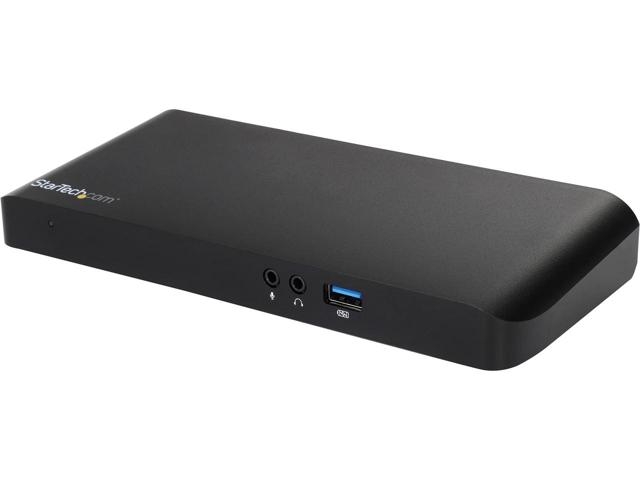
Startech Usb-c Dual-monitor Docking Station For Laptops - Mst & Power Delivery - 4k Dp Or Hdmi
SKU
234566
Brand
Warranty
Standard Manufacturer's Warranty
No Longer Available
$0.00
Buy Now And Earn 0 Reward Points!
QUICK OVERVIEW
- USB Type-C Laptop Docking Station MST30C2DPPD

Power and charge your laptop through USB Type-C (5Gbps), and create an MST based, dual-monitor workstation
| .jpg) |
Connect just one adapter to power the dock and your laptop USB-C is here. It’s the future of universal connectivity, and many new laptops and tablets already feature USB Type-C ports. This versatile laptop dock capitalizes on the full potential of USB Type-C, which simultaneously transfers power, video, and data. This docking station supports USB Power Delivery (up to a maximum of 60 watts), so you can power and charge your laptop directly through its USB-C port. Because a single power adapter can be used for your dock and laptop, you can reduce clutter at your workstation. Plus, you don’t need to carry or remember an extra power adapter when you’re traveling to or from the office. Typical USB Type-A docks restrict video and data to 5Gbps shared bandwidth. This USB Type-C dock allocates data and video traffic separately, so extra bandwidth can be diverted to a particular video or data function, as needed. The USB-C laptop dock offers optimal performance when using multiple monitors and peripherals, so you can get more work done in less time. |  |
 | Enjoy dual-monitor video output This versatile dock lets you easily connect dual monitors. With more monitors, you can multitask and increase productivity, by eliminating the hassle of flipping between several open windows. For dual video, simply connect your 1920 x 1200p DisplayPort and HDMI monitors. |
Easily connect a 4K display through USB-CThe USB-C laptop dock features a DisplayPort and an HDMI port, giving you the flexibility to connect your displays as needed. It supports dual monitors or a single high-resolution 4K monitor. For extra screen space, this dock offers support for the higher 4096 x 2160p resolution, unlike traditional 4K docking stations that only support 3840 x 2160p.For 4K output, you can connect:
|  |
 | Everything you need to create a full-sized workstationThis full-featured universal docking station offers the ports you need to create a full-sized workstation, including four USB 3.0 ports (including a fast charge-and-sync port and a USB-C port), plus Gigabit Ethernet, audio, and microphone connections. |
Universally supported Unlike some proprietary docking stations designed only to work with specific laptop models, this universal laptop dock works with multiple brands. All you need is a laptop’s USB-C port that supports DP alt mode and USB Power Delivery, and you can be up and running quickly. With universal support, you can use this dock with different laptops now, or in the future. The MST30C2DPPD is backed by a StarTech.com 2-year warranty and free lifetime technical support. |  |
Please note
- ENSURE YOUR LAPTOP’S DRIVERS, FIRMWARE, AND OPERATING SYSTEM ARE UP TO DATE PRIOR TO USING THE DOCKING STATION.
- VIDEO OUTPUT CAPABILITIES ARE DEPENDENT ON THE VIDEO CARD AND HARDWARE SPECIFICATION OF YOUR CONNECTED LAPTOP. CERTAIN VIDEO CARDS HAVE LIMITED MST SUPPORT, WHILE SOME MONITORS WILL ALSO LIMIT THE AVAILABLE RESOLUTION.
- NOT ALL USB-C PORTS SUPPORT THE FULL FUNCTIONALITY OF THE USB TYPE-C STANDARD. ENSURE THAT YOUR LAPTOP USB-C PORT SUPPORTS DP ALT MODE, AS WELL AS USB POWER DELIVERY.
- NOT ALL THUNDERBOLT 3 USB-C PORTS SUPPORT THE FULL FUNCTIONALITY OF THE THUNDERBOLT 3 STANDARD. ENSURE THAT YOUR LAPTOP THUNDERBOLT 3 PORT SUPPORTS USB POWER DELIVERY.
- MAC OS DOES NOT SUPPORT MST.

Applications
- An essential accessory for the latest USB-C equipped laptops such as the MacBook (single display only), Dell XPS™ 15, 13, or 12, Dell Latitude™ laptops and 2-in-1s, HP Chromebook™ 13 (single display only), Google Chromebook Pixel™ (single display only), as well as many Windows® based tablets
- Power and charge your USB-C equipped laptop, using only the dock’s power adapter
- Perfect for office workers, graphic designers, animators, engineers, financial professionals, and many more professions
- Create a full-size workstation that’s ideal for hot desk and BYOD (Bring Your Own Device) users, or for CYOD (Choose Your Own Device) applications
| Connector(s) | |
| Connector Type(s) | 3.5 mm Mini-Jack (3 Position) Female |
| DisplayPort (20 pin) Female | |
| HDMI (19 pin) Female | |
| RJ-45 Female | |
| USB 3.0 A (Fast-Charge, 9 pin, SuperSpeed) Female | |
| USB Type-A (9 pin) USB 3.0 Female | |
| USB Type-C (24 pin) USB 3.0 Female | |
| Environmental | |
| Humidity | 5%~95% RH (Non-condensing) |
| Operating Temperature | 5?C to 35?C (41?F to 95?F) |
| Storage Temperature | -40?C to 70?C (-40?F to 158?F) |
| Hardware | |
| 4K Support | Yes |
| Bus Type | USB-C |
| Chipset ID | Cypress - CYPD1122-40 MegaChips - STDP4320 MegaChips - MCDP2850 Cypress - CYUSB3328-88LTXC Cypress - CYUSB3610-68LTXC Texas Instruments - PCM2912APJT |
| Displays Supported | 2 |
| Fast-Charge Port(s) | Yes |
| Industry Standards | USB Power Delivery Specification Rev. 2.0 USB Battery Charging Specification Rev. 1.2 DisplayPort 1.2 with MST IEEE 802.3, IEEE 802.3u, IEEE 802.3ab USB 3.0 - Backward compatible with USB 2.0 and 1.1 |
| Indicators | |
| LED Indicators | Power (Green) |
| RJ45 Activity (Yellow) | |
| RJ45 Link (Green/Amber) | |
| Packaging Information | |
| Shipping (Package) Weight | 1000 g [35.3 oz] |
| Performance | |
| Auto MDIX | Yes |
| Compatible Networks | 10/100/1000 Mbps |
| Full Duplex Support | Yes |
| Maximum Data Transfer Rate | 5 Gbps (USB 3.0) 2 Gbps (Ethernet; Full-Duplex) |
| Maximum Digital Resolutions | Single display - DisplayPort - 3840 x 2160 @ 30Hz Single Display - HDMI - 3840 x 2160 @ 30Hz Dual displays - DisplayPort or HDMI - 1920 x 1200 @ 60Hz |
| Type and Rate | USB 3.0 - 5 Gbit/s |
| UASP Support | Yes |
| Physical Characteristics | |
| Color | Black |
| Enclosure Type | Plastic |
| Product Height | 28 mm [1.1 in] |
| Product Length | 210 mm [8.3 in] |
| Product Weight | 133 g [4.7 oz] |
| Product Width | 90 mm [3.5 in] |
| Power | |
| Center Tip Polarity | Positive |
| Input Current | 1.5 A |
| Input Voltage | 100 ~ 240 AC |
| Output Current | 4.5 A |
| Output Voltage | 20V DC |
| Plug Type | N |
| Power Consumption (In Watts) | 90 |
| Power Delivery | 60W |
| Power Source | AC Adapter Included |
| Software | |
| OS Compatibility | Windows? 7, 8, 8.1, 10 Mac OS 10.10 to 10.13 Chrome OS Chrome and Mac OS do not support MST |
| Special Notes / Requirements | |
| Note | A 4K-capable DisplayPort or HDMI display is required to achieve 4Kx2K resolution |
| For a dual-monitor configuration the host laptop must support MST | |
| If you are connecting multiple DisplayPort monitors in a daisy chain through the dock's DisplayPort connection, the monitors must support DisplayPort 1.2 and MST | |
| Not all USB-C ports support the full functionality of the USB Type-C standard. Ensure that your host USB-C port supports USB Power Delivery 2.0 and DP alt mode. | |
| USB 3.0 is also known as USB 3.1 Gen 1; this connectivity standard offers speeds up to 5Gbps | |
| Video output capabilities are dependent on the video card and hardware specifications of your connected host laptop. Certain video cards have limited MST or video support, while some monitors will also limit the available resolution. | |
| System and Cable Requirements | A host laptop with an available USB-C port (to ensure full adapter functionality, the host USB-C port must support USB Power Delivery 2.0 and DP alt mode) |
| What's in the Box | |
| Included in Package | power cords (NA/UK/EU/AU) |
| quick-start guide | |
| universal power adapter | |
| USB-C docking station for laptops | |
| USB-C host cable | |
