




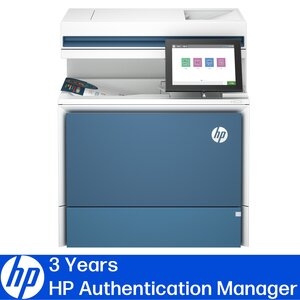
Color LaserJet Enterprise Mfp 5800dn Printer + HP Authentication Suite (3 Year Term) 74424060
SKU
440457
Brand
MPN
74424060
Warranty
Standard Manufacturer's Warranty
$3,766.00
Buy Now And Earn 3766 Reward Points!

For installation services or technical questions related to HP Authentication Manager, please contact [email protected]
HP Authenication Manager – Support Page / Prerequisites / Product Brief
Meet the Microsoft 365 Print Experience
Discover how HP Authentication Manager, Universal Print, and Microsoft 365 work together to deliver secure cloud managed printing across your organisation.
Your Microsoft 365 Environment, Now at the Printer
The print and scan experience built for Microsoft 365.
• Your printer is no longer just a device - it’s part of Microsoft 365.
Meet the Microsoft connected HP printer, designed to work seamlessly with Microsoft Entra ID (Azure AD), Universal Print, and the Microsoft 365 apps your users rely on every day. With HP Authentication Manager, secure print release becomes a natural extension of your Microsoft environment — eliminating passwords, PINs, and standalone print infrastructure. Users can authenticate once and securely print documents originating from:
• OneDrive
• SharePoint
• Outlook
• Microsoft Teams
• And other Microsoft 365 apps
All without additional card readers, legacy print servers, or complex user workflows.
• Microsoft identity. Printer level security. Enterprise ready.
HP Authentication Manager integrates directly with Microsoft Entra ID, enabling secure, device based authentication at the printer using modern identity controls, including MFA. Built on the HP Workpath platform, this solution allows organisations to:
• Use Microsoft identity as the single source of trust
• Apply Zero Trust principles to print workflows
• Prevent unauthorised access to sensitive documents
• Support mobile authentication and NFC-based sign in
Your Microsoft security model - extended to the printer.
• Simplify print with Microsoft Universal Print
By supporting Microsoft Universal Print, HP Enterprise printers remove the need for traditional print servers, enabling cloud managed printing directly from Microsoft 365. Combined with HP Authentication Manager, Universal Print lets IT teams:
• Manage printers centrally through Microsoft
• Secure print jobs using Microsoft identity
• Support hybrid and remote workforces
• Reduce infrastructure complexity
Print that scales with Microsoft 365 - without trade offs.
HP Authenication Manager – Support Page / Prerequisites / Product Brief
Meet the Microsoft 365 Print Experience
Discover how HP Authentication Manager, Universal Print, and Microsoft 365 work together to deliver secure cloud managed printing across your organisation.
Your Microsoft 365 Environment, Now at the Printer
The print and scan experience built for Microsoft 365.
• Your printer is no longer just a device - it’s part of Microsoft 365.
Meet the Microsoft connected HP printer, designed to work seamlessly with Microsoft Entra ID (Azure AD), Universal Print, and the Microsoft 365 apps your users rely on every day. With HP Authentication Manager, secure print release becomes a natural extension of your Microsoft environment — eliminating passwords, PINs, and standalone print infrastructure. Users can authenticate once and securely print documents originating from:
• OneDrive
• SharePoint
• Outlook
• Microsoft Teams
• And other Microsoft 365 apps
All without additional card readers, legacy print servers, or complex user workflows.
• Microsoft identity. Printer level security. Enterprise ready.
HP Authentication Manager integrates directly with Microsoft Entra ID, enabling secure, device based authentication at the printer using modern identity controls, including MFA. Built on the HP Workpath platform, this solution allows organisations to:
• Use Microsoft identity as the single source of trust
• Apply Zero Trust principles to print workflows
• Prevent unauthorised access to sensitive documents
• Support mobile authentication and NFC-based sign in
Your Microsoft security model - extended to the printer.
• Simplify print with Microsoft Universal Print
By supporting Microsoft Universal Print, HP Enterprise printers remove the need for traditional print servers, enabling cloud managed printing directly from Microsoft 365. Combined with HP Authentication Manager, Universal Print lets IT teams:
• Manage printers centrally through Microsoft
• Secure print jobs using Microsoft identity
• Support hybrid and remote workforces
• Reduce infrastructure complexity
Print that scales with Microsoft 365 - without trade offs.
| Product Type | Laser Multifunction Printer |
| Form Factor | Desktop |
| Product Model | 5800dn |
| Scanner Type | Flatbed/ADF |
| Brand Name | HP |
| Touchscreen | Yes |
| Copy Color | Color |
| Scan Color | Color |
| Fax Color | Monochrome |
| Ethernet | Yes |
| Display Screen Type | CGD |
| Ethernet Technology | Gigabit Ethernet |
| USB | Yes |
| Energy Star | Yes |
| Product Family | LaserJet Enterprise |
| Copier Type | Flatbed |
| Maximum Document Enlargement | 400% |
| Maximum Document Reduction | 25% |
| A4 Mono Copy Speed (cpm) | 43 |
| A4 Color Copy Speed (cpm) | 43 |
| Maximum Copy Resolution (dpi) | 600 x 600 |
| Screen Size | 8" |
| Fax Type | Flatbed |
| Speed Dialing | Yes |
| Manufacturer Part Number | 6QN29A |
| Manufacturer Website Address | http://www.hp.com/au/ |
| Manufacturer | HP Inc. |
| Product Name | HP CLR LJ ENT 5800DN + 3YR AUTH MAN |
| Product Line | LaserJet Enterprise |
| Near Field Communication (NFC) | Yes |
| Weight (Approximate) | 38 kg |
| Height | 583 mm |
| Width | 5000 mm |
| Depth | 4600 mm |
| Scan To | E-mail,Fax,Network Folder,USB,FTP |
| Optical Resolution (dpi) | 600 |
| Additional Warranty Information | Onsite |
| Limited Warranty Duration | 4 Year |
| Shipping Dimensions | Shipping Weight 39.8 KG |
Color LaserJet Enterprise MFP 5800dn Printer + HP Authentication Suite (3 Year Term)
